Agent notifications
If you run Claude Code for any length of time you know the pattern: it works for twenty minutes, then stops on a permission prompt and waits until you come back.
TermBridge watches for that pause and sends a push notification the instant it happens — even when the app is closed.
Answer from the notification
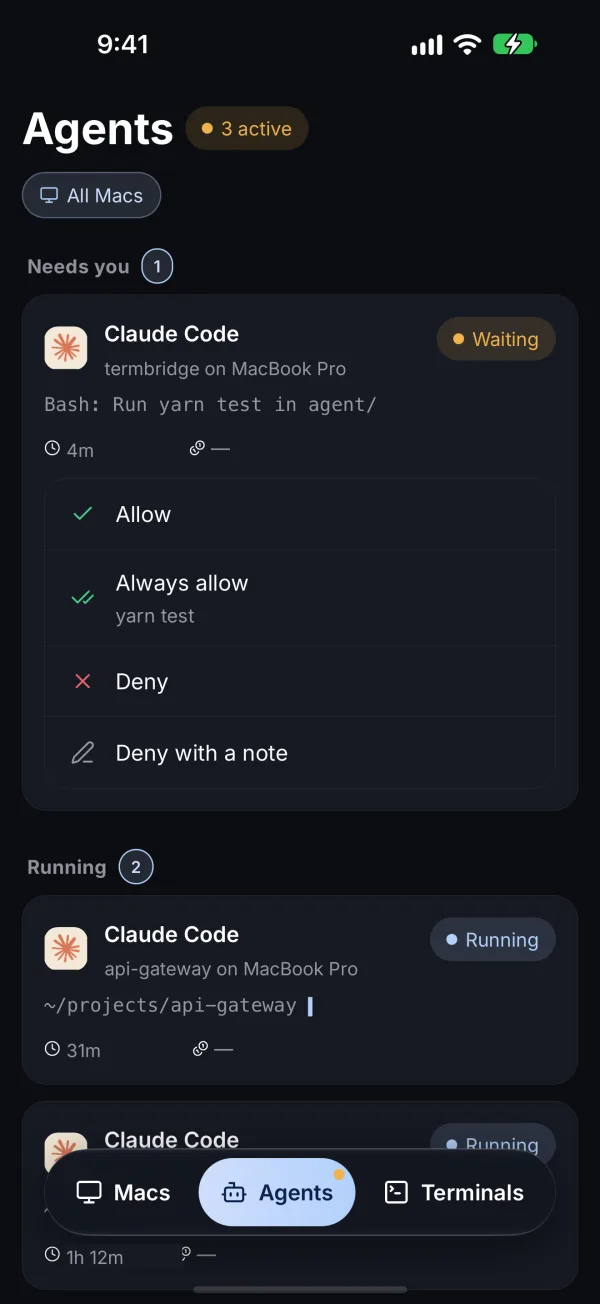
Press and hold the notification and Approve right there. Tap it instead and TermBridge lands you on that request in the Agents tab, with Allow, Always allow, Deny and Deny with a note. See Agents.
This is the feature that makes it comfortable to kick off a long run and walk away from your desk.
What triggers a notification
Notifications fire when an AI coding agent — currently Claude Code — appears to be waiting on you: a permission prompt, a question, or a request for input. TermBridge detects this by watching the agent’s own state, not by guessing at arbitrary shell prompts. So a plain read in a bash script won’t ping you; a Claude Code approval prompt will. A process that’s simply running doesn’t notify you — only one that’s blocked waiting for a human.
Enabling notifications
- In TermBridge, open Settings → Notifications & approvals and turn them on.
- Allow notifications when iOS prompts you (or later in iOS Settings → Notifications → TermBridge).
The push goes over Apple’s or Google’s push service. It carries the repo name and the one line Claude asked, for example “Run yarn test in agent/?”. Nothing else from your terminal leaves the encrypted link.
Next
Curious how the secure path works? Read the Security model.